
Telstra Home Dashboard™5.0.0 - Get APK
You'll be able to download in few seconds.
Publisher Description

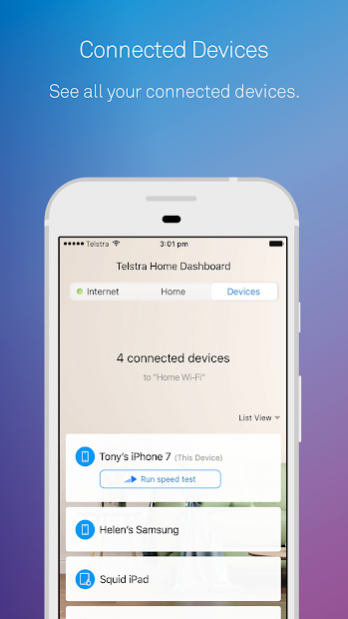
Telstra Home Dashboard has been designed to help you and your family have more controls of your Home Broadband experience. You will be able to see all connected devices, easily share your Wi-Fi credentials with friends and family, set parental controls to keep your kids safe and also run speed tests to ensure your service is running at its best.
With Telstra Home Dashboard you can:
1. Stay informed about your service status and any outages in your area
2. See all your devices connected to your Home Broadband
3. Monitor your monthly data allowance
4. Keep your family and gadgets safe with Broadband Protect
5. Run speed tests and keep speed history to track performance
6. Access simple troubleshooting flows, you can even restart your Gateway from the app!
7. Access Tips and tricks so you can learn more about your home network
8. Map your Wi-Fi in the app to find those weak signal spots
About Telstra Home Dashboard™
The company that develops Telstra Home Dashboard™ is Telstra Corporation Ltd.. The latest version released by its developer is 5.0.0.
To install Telstra Home Dashboard™ on your Android device, just click the green Continue To App button above to start the installation process. The app is listed on our website since 2019-10-09 and was downloaded 0 times. We have already checked if the download link is safe, however for your own protection we recommend that you scan the downloaded app with your antivirus. Your antivirus may detect the Telstra Home Dashboard™ as malware as malware if the download link to com.telstra.wifidiag is broken.
How to install Telstra Home Dashboard™ on your Android device:
- Click on the Continue To App button on our website. This will redirect you to Google Play.
- Once the Telstra Home Dashboard™ is shown in the Google Play listing of your Android device, you can start its download and installation. Tap on the Install button located below the search bar and to the right of the app icon.
- A pop-up window with the permissions required by Telstra Home Dashboard™ will be shown. Click on Accept to continue the process.
- Telstra Home Dashboard™ will be downloaded onto your device, displaying a progress. Once the download completes, the installation will start and you'll get a notification after the installation is finished.
Program Details
System requirements
Download information
Pricing
Version History
version 5.0.0
posted on 2019-10-09
In this release the Telstra Home Dashboard app has been clean up to streamline the customer experience. Some features that are no longer relevant to the market have been removed and some links and images have been updated to reflect changes. The app has been updated to support a newer version of Android.
version 4.7.0
posted on 2019-10-07
In this release the Telstra Home Dashboard app has a implemented a brand new on boarding look and feel to support the latest in market Telstra Wi-Fi equipment. This combination provides customers with the best user experience and most simple steps to get their whole home connected in no time.
In addition, support for both Gen 1 & Gen 2 Smart Wi-Fi boosters have been integrated into this release.
version 2.0.66
posted on 2016-08-25
• Ability to quickly access your Wi-Fi name & password on our Telstra gateways, to easily share it with friends and family,• New functionality to show all the devices that are connected to the home gateway giving them more visibility,• Ability to perform speed tests that look at both internet and Wi-Fi speeds in the home to allow customers to identify and solve speed related issues,• Option to import floorplans and add multiple levels to your home through the enhanced ‘Map my Wi-Fi’ feature
Disclaimer
External Download
We do not host Telstra Home Dashboard™ on our servers. We did not scan it for viruses, adware, spyware or other type of malware. This app is hosted by Galad and passed their terms and conditions to be listed there. We recommend caution when installing it.
The APK Download link for Telstra Home Dashboard™ is provided to you by apps112.com without any warranties, representations or guarantees of any kind, so access it at your own risk.
If you have questions regarding this particular app contact the publisher directly. For questions about the functionalities of apps112.com contact us.
